Feature FlagsUsers and user segments
Shareable Segments
Overview
Shareable Segments allow you to define a group of users that can be reused across different environments, projects, or organizations. This simplifies management and ensures consistency when targeting the same user groups in various contexts.
Create a Shared Segment
- Navigate to the Segments page.
- Click the + New segment button.
- Choose the Shareable segment type.
- Enter a human-readable Name.
- (Optional) Add a Description.
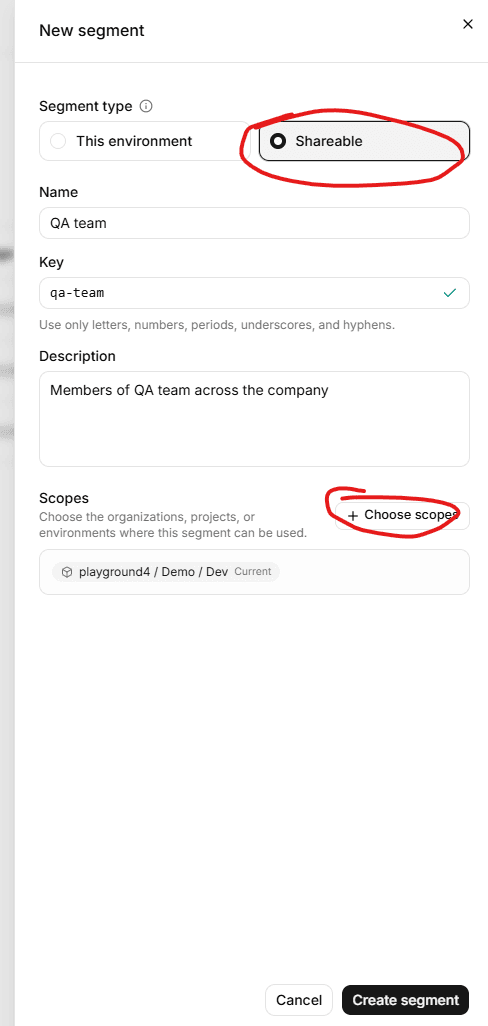
- Click the Choose scopes button.
- Select the desired scopes in the choose scopes dialog
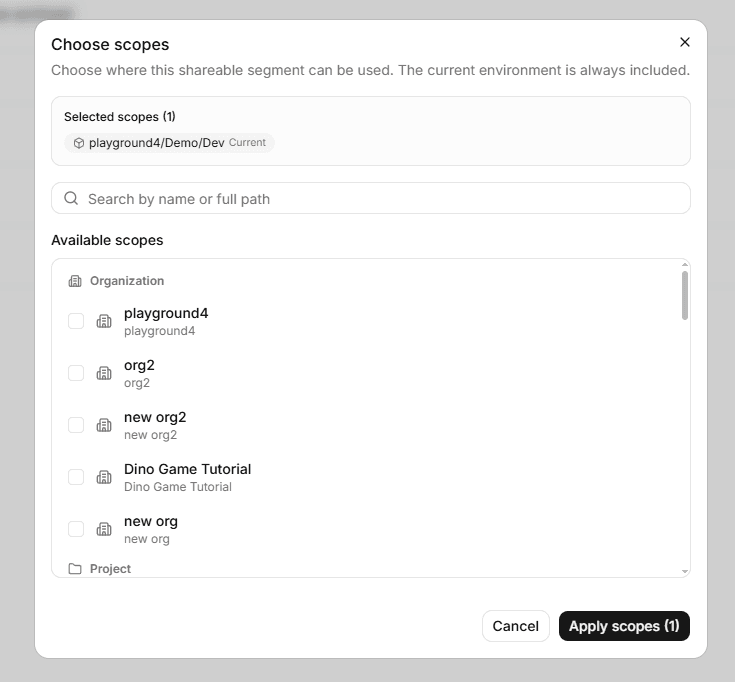
- Click the Create segment button. The segment's details page appears.
Scopes
A shareable segment can have one or more of the following scopes:
- Environment: The segment can be used within the specific environment(s) you select.
- Project: The segment can be used across all environments within the selected project(s).
- Organization: The segment can be used across all environments within the selected organization(s).
And by default, the current environment is selected and cannot be removed.
Current Limitations
- After a shared segment is created, you cannot change its Scopes.
- A regular segment can reference both global users and environment users, but a shared segment can only reference global users. That's because the environment users are specific to the environment, and the shared segment is meant to be used across different environments.